
Bread Financial
Bread Financial Holdings, Inc.Finance
4.73.12K Reviews
- Version
- 5.8.2
- Installs
- 500.00K
- Age Rating
- Everyone
Screenshots

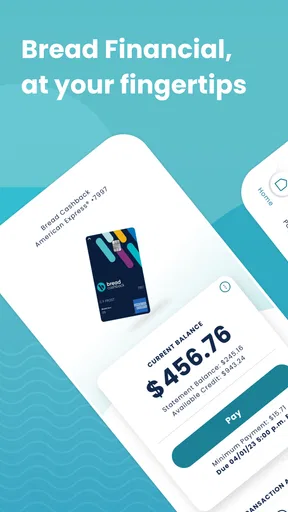
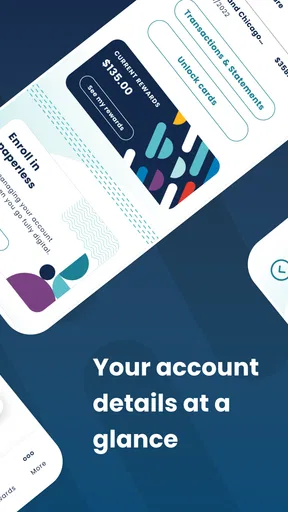
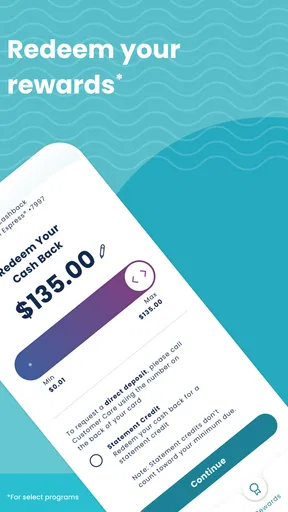
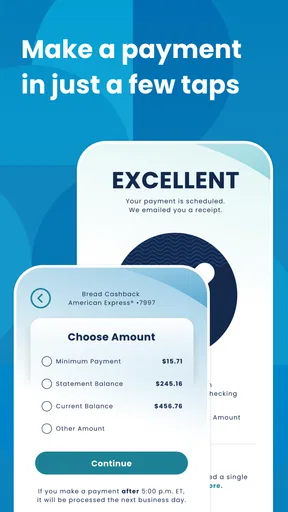
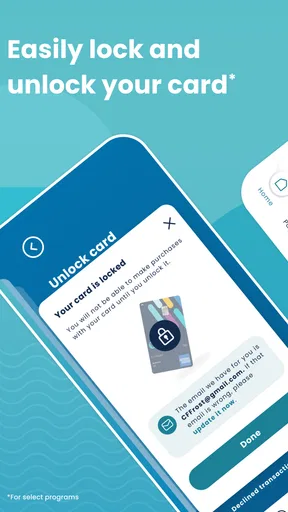
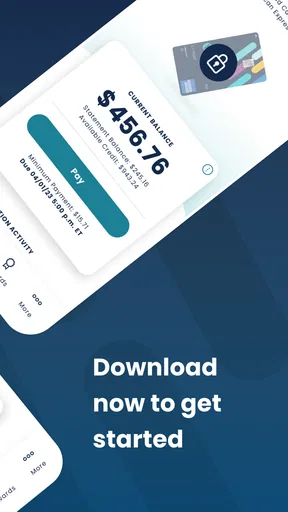
Our Review of Bread Financial
 Analysis by Appyee
I found Bread Financial most useful when I treated it as a focused account-management tool rather than a complete personal finance app. It is designed for customers who already have a Bread Financial account and want to handle routine tasks from a phone: checking account activity, making a payment, and using available rewards. That narrow purpose is also its main strength. I could get to the action I needed without sorting through budgeting tools, investment dashboards, or unrelated financial products.
The app is free, carries an Everyone age rating, and comes from Bread Financial Holdings, Inc. Its current version is 5.8.2, and it requires Android 11 or later. With a 4.7 average from roughly 39 thousand ratings and more than 500 thousand installs, it has clearly become a familiar option for many account holders. Those figures suggest a mature everyday utility, although they do not remove the need to judge it by your own account and payment habits.
Where the experience tends to get stuck
The first point of friction is usually not the payment itself. It is getting into the correct account and recognizing which part of the account needs attention. A finance app can feel confusing when a user expects a general banking home screen but instead sees information tied to a specific Bread Financial relationship. I recommend slowing down at sign-in and checking that the account details shown after access match the account you intended to manage.
That small check matters if you handle more than one account or use the app only occasionally. Before starting a payment, I would look at the displayed balance, recent activity, and any visible due information. This is a safer workflow than opening the payment screen immediately and assuming that the first amount presented is the amount you want to send.
The app’s purpose is straightforward, but “straightforward” does not always mean every screen is self-explanatory. A user who only wants to redeem rewards may initially spend time looking through account activity or payment areas. I found it better to decide on the task first: review activity, make a payment, or redeem rewards. Keeping that goal in mind reduces wandering and makes it easier to notice if the app has not loaded the expected account information.
The most important habit is to verify the account context before confirming a financial action. This is especially useful when moving quickly from a notification, returning to the app after a long break, or using a phone shared with another household member. The extra glance costs little and helps separate a genuine app problem from a simple navigation mistake.
Why a failed payment attempt can be misleading
If a payment screen does not behave as expected, several different issues can look identical from the user’s point of view. The app may still be loading, the connection may be unstable, the account session may need to be refreshed, or the entered information may not match what the account expects. I would not repeat the payment several times without first checking whether the earlier attempt actually went through.
My practical approach is to return to the account activity area and look for a new pending or completed entry before trying again. If the screen is frozen, I would close and reopen the app, then sign in again if necessary. These are ordinary recovery steps, but they are more sensible than creating duplicate attempts because a confirmation screen took too long to appear.
Another common source of confusion is the difference between an action being submitted and the account immediately showing its final result. A user may expect the balance or reward total to change at once. Instead of treating an unchanged figure as proof of failure, I would review the recent activity and any status language shown in the account. The useful question is not only “Did the screen change?” but also “Does the account record show that the request was received?”
Setup checks that make the first session easier
Before relying on Bread Financial for a time-sensitive payment, I would prepare the phone rather than installing it at the last minute. The app is intended for Android devices running version 11 or newer, so the first check is simple: confirm that the phone meets that requirement. If it does not, changing passwords or reinstalling the app will not solve the compatibility problem; a newer supported device or another account-management route would be more appropriate.
I would also make sure the app has a dependable internet connection during sign-in and payment submission. A weak connection can create a particularly awkward situation in finance apps because the user may not know whether the action was rejected or merely delayed. Switching from an unreliable connection to a stable one before beginning is a small step that can prevent unnecessary retries.
During setup, use the same account information you normally use for Bread Financial rather than assuming that a different financial-services login will work. The app is not a replacement for every banking or budgeting service. Its value comes from giving its own account holders a mobile place to manage their Bread Financial relationship, so expecting it to aggregate unrelated accounts will lead to disappointment.
It is also worth opening the app when you have enough time to inspect the account calmly. Check that the account area loads, review the activity display, and locate the rewards section before you need either one urgently. This creates a mental map of the app and makes later use less stressful. I prefer this approach to discovering the payment flow while standing in a checkout line or trying to meet a due date.
A useful preparation routine
My recommended first-session routine is deliberately modest. Sign in, confirm the account identity, inspect recent activity, locate the payment action, and then find the rewards area. Do not make a payment merely to test the app. The goal is to understand where the important information lives and to notice whether the account data appears current.
For rewards, I would check the available balance and the redemption choices shown in the app before planning a purchase around them. Rewards are most useful when you know what is actually available and understand the confirmation step. If a redemption does not appear to complete, I would check the account again before attempting it repeatedly, just as with a payment.
This preparation also answers an important practical question: can Bread Financial replace a budgeting app? In my view, no. It is better for managing the Bread Financial account itself than for building a complete picture of spending across cards, bank accounts, cash, and investments. A separate budgeting tool may be the better companion if your main goal is category tracking or household planning.
Recovering a workflow without making it worse
When something goes wrong, I use a fixed recovery order. First, I stop and note what I was trying to do. Second, I check whether the account screen has updated. Third, I close and reopen the app. Fourth, I try again only if the account record gives no sign that the action was accepted. This order is valuable because it protects against duplicate payments and repeated reward requests.
If sign-in fails, I would verify the basic details carefully rather than making many rapid attempts. Check for typing errors, make sure the connection is stable, and restart the app if the screen appears stuck. If the problem remains, using the account’s official support route is more sensible than guessing at credentials or repeatedly reinstalling the application.
If the app opens but information looks incomplete, I would first give the screen a moment to finish loading and then refresh the session by closing and reopening it. I would avoid assuming that a blank or outdated-looking area means the account has changed. A temporary connection or session issue can affect what is displayed without changing the underlying account.
For a payment workflow, I would record the approximate time of the attempt and then inspect the activity area. That simple note can be helpful if support is needed, because it gives you a clear description of what happened instead of a vague report that “the payment did not work.” It also helps you avoid submitting the same payment again while uncertain.
For reward redemption, the same discipline applies. Confirm that the reward was available, start the redemption once, and look for a resulting account entry or status. If the app closes or returns to an earlier screen, do not assume the request failed. Check the account first. This is one of the less obvious but most valuable habits for any app that changes a financial balance or reward total.
What I would check before contacting support
Before asking for help, I would collect the device’s Android version, the Bread Financial app version, the exact task that failed, and whether the account showed any resulting activity. The app’s current version is 5.8.2, so checking that you are not working with an outdated installation is sensible. I would describe the screen and the timing without sharing passwords, security codes, or other sensitive information.
I would also distinguish between a login problem, a display problem, and a transaction problem. A login problem prevents access. A display problem allows access but shows incomplete or stale information. A transaction problem occurs after you start a payment or redemption. Those categories lead to different troubleshooting conversations, and separating them makes support more efficient.
Reinstalling should not be my first response to a payment uncertainty. It may refresh the application, but it does not answer whether an earlier transaction was submitted. I would inspect the account record first and preserve any confirmation details. In financial situations, understanding the account status is more important than making the app look freshly installed.
When the app is not the cause
One of the most important distinctions is between an app issue and an account or payment issue. Bread Financial can provide a mobile interface, but it cannot make every external condition disappear. A payment may be affected by account status, entered information, timing, or the payment method involved. If the app is responsive and shows a clear message, the next step may be to address that message rather than repeatedly restarting the phone.
The same applies to rewards. If a reward is not available for redemption, that may reflect the account’s current status rather than a broken screen. I would review the information presented in the account and avoid planning a purchase around a reward until the app clearly shows it as available and the redemption flow has been accepted.
There is also a difference between an account balance and a personal spending plan. Bread Financial can help me see and manage the relationship represented in the app, but it does not replace the judgment required to decide whether a payment fits my monthly budget. For that broader decision, I would use a separate budgeting method and treat the app as the place to verify account-specific details.
This is where the app compares favorably with ordinary alternatives and falls short of others. Compared with using a mobile browser, a dedicated app can feel faster to open and easier to use for repeated account checks. Compared with a full banking app, however, it is more specialized and may not provide the wider account overview someone wants. Compared with a budgeting app, it is closer to an account service tool than a planning workspace.
That specialization is not a flaw for the right user. If your main need is checking a Bread Financial account, sending a payment, and handling rewards without opening a laptop, the focused design makes sense. If you want one application to combine every financial relationship, analyze spending categories, or manage investments, I would choose a broader financial tool instead and keep this app for its specific account tasks.
Who will get the most value
I think Bread Financial is best for an existing account holder who prefers phone-based management and wants a direct route to routine actions. It is also useful for someone who checks activity frequently enough to catch unfamiliar entries early, rather than waiting for a monthly review. The rewards area adds practical value when you already use the account and want to handle available rewards as part of the same workflow.
It is less suitable for a person who does not have a Bread Financial relationship, someone using an older Android phone below the required system version, or anyone searching for a complete household finance dashboard. Those users may spend more time working around the app’s focused purpose than benefiting from it. I would also hesitate to recommend relying on it as the only place for financial planning; a payment interface is not the same thing as a budget.
My practical verdict after using it
Bread Financial succeeds because it keeps its attention on a few useful account tasks. I found the strongest experience came from checking account context first, reviewing activity before repeating an uncertain action, and treating payments and rewards as workflows that deserve confirmation rather than quick taps. Those habits matter more than flashy extras in a finance app.
The main friction is that a focused account app can feel limited if you arrive expecting a complete banking replacement. It also requires careful interpretation when a payment or redemption appears slow, because the safest response is to verify the account record instead of trying again immediately. That is manageable, but it means the app rewards patient use more than hurried use.
For Android users on a supported device, the free price makes it an easy practical choice if Bread Financial already manages part of your finances. I would recommend it to a friend who wants convenient account access, payment handling, and reward redemption in one place. I would not recommend it as a substitute for a budgeting system or a broad banking hub.
My final advice is simple: install it before you urgently need it, explore the account and rewards areas without submitting anything, and make your first real payment only when you can verify the result afterward. Used that way, Bread Financial is a sensible, specialized finance app whose value comes from reducing routine account-management steps without pretending to solve every financial task.
For its intended audience, the combination of a strong 4.7 average, a free download, and a focused set of account tools makes it worth trying. Just keep a separate record of your wider finances, confirm every important transaction in the account activity, and remember that a smooth mobile interface cannot replace careful financial decisions.
Verdict
Strengths of Bread Financial
- Convenient access to account balances, payments, and transaction history.
- Payment reminders can help users avoid missed due dates.
- Secure login options add protection for sensitive financial information.
- Useful card management tools make account monitoring easier.
- Paperless statements reduce clutter and simplify record keeping.
Limitations of Bread Financial
- Features may vary depending on the specific Bread Financial account.
- Some users may experience delays when balances or payments update.
- Requires internet access for most account management functions.
- Customer support options may not be as immediate as phone assistance.
- App usefulness is limited for people without a Bread Financial card.
Similar Picks in This Category
View All
Google Wallet
Google LLC4.3

Airtel: Recharge, Bank & Loans
Airtel4.0

PayPal - Pay, Send, Save
PayPal Mobile4.2

DANA Indonesia Digital Wallet
PT Espay Debit Indonesia Koe4.5

Binance: Buy Bitcoin & Crypto
Binance Inc.4.8

Cash App
Block, Inc.4.7
Frequently Asked Questions
What is Bread Financial, and what can I use the app for?
Bread Financial is a financial services app designed to help eligible customers manage Bread Pay accounts, store credit cards, and related payment products in one place. After signing in, you can typically review your balance, available credit, recent transactions, payment due dates, statements, and account notifications. The exact tools shown depend on the specific Bread Financial account or retail card you have.
Is the Bread Financial app safe to use for managing my account?
The app is intended to provide secure access to your Bread Financial account, using login protection and security measures designed to help safeguard personal and financial information. However, no digital service is completely risk-free. Download it only from an official app store, keep your device and app updated, avoid sharing verification codes, and contact official support immediately if you notice suspicious activity or an unfamiliar transaction.
Can I make payments through the Bread Financial app?
For supported accounts, the Bread Financial app allows you to manage payments directly from your mobile device. You may be able to schedule a one-time payment, review payment history, check the minimum amount due, and confirm the payment deadline. You will generally need a valid payment method, such as a linked bank account. Processing times and available options can vary by account.
Do I need a Bread Financial account to use the application?
Yes, the main features are intended for existing Bread Financial customers with an eligible account, such as a participating retail credit card or Bread Pay account. You normally need to register or sign in using account information and complete identity verification. If you do not yet have an eligible product, the app may provide limited information, but it is not a general-purpose banking application.
What should I do if I cannot sign in or find my account in the app?
If you cannot access your account, first check that you are using the official Bread Financial app, entering the correct credentials, and connecting through a reliable internet connection. Use the password-reset or account-recovery options provided on the sign-in screen. If your card or account is not supported, or recovery fails, contact Bread Financial through its official website or the support details shown in the app.
